
experimental
experimental.fsModuleCache 4.0.11+
- Type:
boolean - Default:
false
Enabling this option allows Vitest to keep cached modules on the file system, making tests run faster between reruns.
You can delete the old cache by running vitest --clearCache.
BROWSER SUPPORT
At the moment, this option does not affect the browser.
You can debug if your modules are cached by running vitest with a DEBUG=vitest:cache:fs environment variable:
DEBUG=vitest:cache:fs vitest --experimental.fsModuleCacheKnown Issues
Vitest creates persistent file hash based on file content, its id, vite's environment configuration and coverage status. Vitest tries to use as much information it has about the configuration, but it is still incomplete. At the moment, it is not possible to track your plugin options because there is no standard interface for it.
If you have a plugin that relies on things outside the file content or the public configuration (like reading another file or a folder), it's possible that the cache will get stale. To workaround that, you can define a cache key generator to specify dynamic option or to opt-out of caching for that module:
import { defineConfig } from 'vitest/config'

export default defineConfig({
  plugins: [
    {
      name: 'vitest-cache',
      configureVitest({ experimental_defineCacheKeyGenerator }) {
        experimental_defineCacheKeyGenerator(({ id, sourceCode }) => {
          // never cache this id
          if (id.includes('do-not-cache')) {
            return false
          }

          // cache this file based on the value of a dynamic variable
          if (sourceCode.includes('myDynamicVar')) {
            return process.env.DYNAMIC_VAR_VALUE
          }
        })
      }
    }
  ],
  test: {
    experimental: {
      fsModuleCache: true,
    },
  },
})
If you are a plugin author, consider defining a cache key generator in your plugin if it can be registered with different options that affect the transform result.
On the other hand, if your plugin should not affect the cache key, you can opt-out by setting api.vitest.experimental.ignoreFsModuleCache to true:
import { defineConfig } from 'vitest/config'

export default defineConfig({
  plugins: [
    {
      name: 'vitest-cache',
      api: {
        vitest: {
          experimental: {
            ignoreFsModuleCache: true,
          },
        },
      },
    },
  ],
  test: {
    experimental: {
      fsModuleCache: true,
    },
  },
})
Note that you can still define the cache key generator even the plugin opt-out of module caching.
experimental.fsModuleCachePath 4.0.11+
- Type:
string - Default:
'node_modules/.experimental-vitest-cache'
Directory where the file system cache is located.
By default, Vitest will try to find the workspace root and store the cache inside the node_modules folder. The root is based on your package manager's lockfile (for example, .package-lock.json, .yarn-state.yml, .pnpm/lock.yaml and so on).
At the moment, Vitest ignores the test.cache.dir or cacheDir options completely and creates a separate folder.
experimental.openTelemetry 4.0.11+
- Type:
interface OpenTelemetryOptions {
  enabled: boolean
  /**
   * A path to a file that exposes an OpenTelemetry SDK.
   */
  sdkPath?: string
}- Default:
{ enabled: false }
This option controls OpenTelemetry support. Vitest imports the SDK file in the main thread and before every test file, if enabled is set to true.
PERFORMANCE CONCERNS
OpenTelemetry may significantly impact Vitest performance; enable it only for local debugging.
You can use a custom service together with Vitest to pinpoint which tests or files are slowing down your test suite.
BROWSER SUPPORT
At the moment, Vitest does not start any spans when running in the browser.
An sdkPath is resolved relative to the root of the project and should point to a module that exposes a started SDK instance as a default export. For example:
import { getNodeAutoInstrumentations } from '@opentelemetry/auto-instrumentations-node'
import { OTLPTraceExporter } from '@opentelemetry/exporter-trace-otlp-proto'
import { NodeSDK } from '@opentelemetry/sdk-node'

const sdk = new NodeSDK({
  serviceName: 'vitest',
  traceExporter: new OTLPTraceExporter(),
  instrumentations: [getNodeAutoInstrumentations()],
})

sdk.start()
export default sdkimport { defineConfig } from 'vitest/config'
export default defineConfig({
test: {
experimental: {
openTelemetry: {
enabled: true,
sdkPath: './otel.js',
},
},
},
})WARNING
It's important that Node can process sdkPath content because it is not transformed by Vitest. See the guide on how to work with OpenTelemetry inside of Vitest.
experimental.printImportBreakdown 4.0.15+
- Type:
boolean - Default:
false
Show import duration breakdown after tests have finished running. This option only works with default, verbose, or tree reporters.
- Self: the time it took to import the module, excluding static imports;
- Total: the time it took to import the module, including static imports. Note that this does not include
transformtime of the current module.
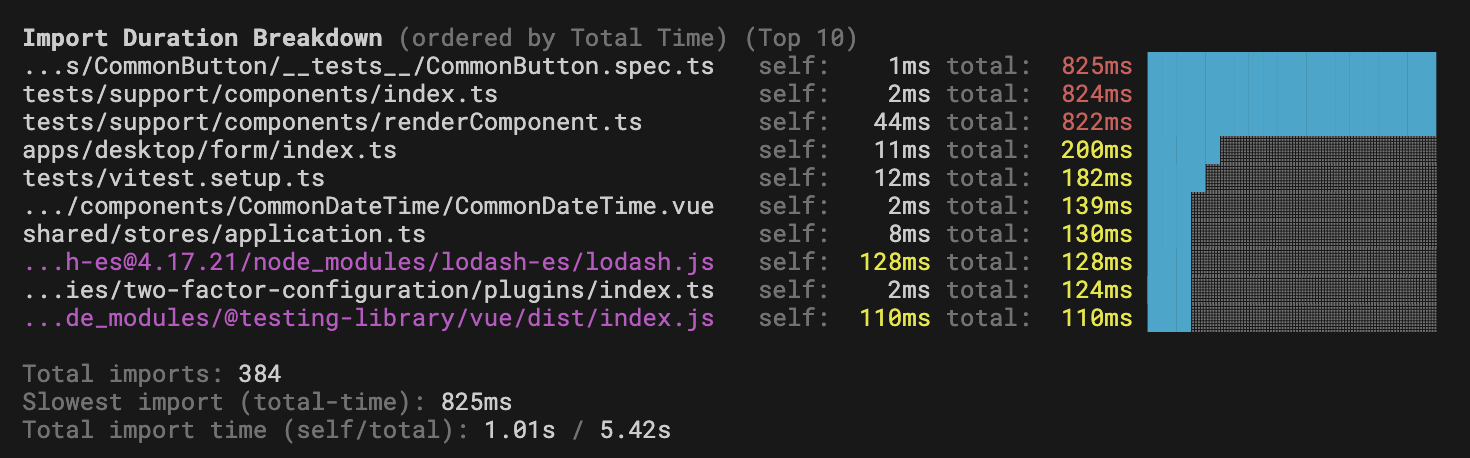
Note that if the file path is too long, Vitest will truncate it at the start until it fits 45 character limit.
INFO
Vitest UI shows a breakdown of imports automatically if at least one file took longer than 500 milliseconds to load. You can manually set this option to false to disable this.